A SOCKS5 proxy only hides the traffic your browser sends through it, and neither Chrome nor Firefox can send UDP through one. WebRTC prefers UDP. So a single connection check can travel straight from your machine to a server the website picked, carrying your real IP, while every page request looks perfectly proxied.
Our latest Chroma kernels close that gap: when your SOCKS5 proxy carries UDP, they relay WebRTC and HTTP/3 traffic through it.
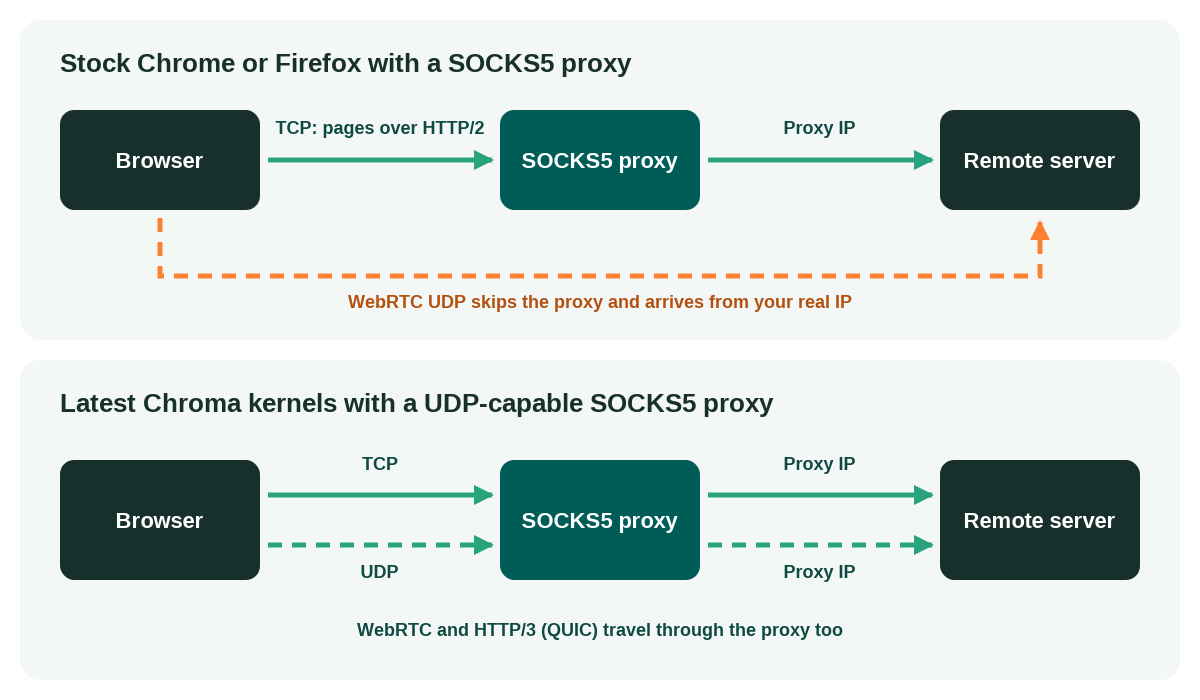
Browsers only send TCP through a SOCKS5 proxy
Browser traffic comes in two kinds. Pages, scripts and API calls mostly travel over TCP. Video calls and peer-to-peer connections (both WebRTC) and HTTP/3 travel over UDP.
The SOCKS5 protocol can carry both. It has a command for UDP, called UDP ASSOCIATE, that has been in the specification since 1996. Browsers never implemented it. Chromium's own proxy documentation says of SOCKS5: "It cannot be used to relay UDP traffic." Firefox has had an open bug for the same gap for years.
So when you attach a SOCKS5 proxy to a browser, you get a tunnel for TCP and nothing for UDP. The two things in a browser that use UDP then fail in two different ways.
WebRTC leaks, and leak tests miss it
WebRTC fails the dangerous way: it sends its UDP packets around the proxy. When a page opens a WebRTC connection, the browser first asks a STUN server what its public address is. That request is a UDP packet. With no way to send it through the proxy, the browser sends it directly from your machine.
Most stealth browsers, Kameleo included, already handle the visible half of the leak. They replace the address that WebRTC reports to JavaScript, so a WebRT leak test that only reads the browser-reported address shows your proxy IP and everything looks fine.
The packet itself is the other half. It still left from your real IP, and whoever runs the STUN or TURN server on the other end can read the source address without asking JavaScript anything. A site only has to compare that server-observed address with the browser-reported one to see that the browser rewrote it. Anti-bot vendors know this. Castle's review of proxy piercing techniques lists WebRTC among the more likely ones to work.
If you run your browsers on your own servers, the stakes are higher. Every profile on a machine leaks the same real IP, which is enough to link them to each other, whatever their fingerprints and proxies say.
Until now you had three ways to deal with it, each with a cost:
- Blocking WebRTC stops the leak, but a browser that refuses WebRTC looks unusual.
- Forcing WebRTC onto TCP sends it through the proxy, but a page can read WebRTC's connection candidates from JavaScript, and a browser that offers no UDP ones looks different from an ordinary visitor.
- Masking the reported IP (above) passes leak tests, but the packets still go out directly.
All three work around the missing tunnel. None of them gives the UDP packet a way through the proxy.
HTTP/3 doesn't leak, it just disappears
HTTP/3 runs on QUIC, and QUIC runs on UDP, so it meets the same missing tunnel. But with HTTP/3 the browser is more careful than with WebRTC. When Chrome sits behind a proxy that can't carry QUIC, it doesn't send QUIC around the proxy. It falls back to HTTP/2 over TCP, which goes through the proxy as usual. Your IP does not leak.
What you lose is HTTP/3 itself. A proxied profile never speaks it, even to sites that offer it, while the same Chrome on a home connection does.
We have not seen an anti-bot vendor document "no HTTP/3" as a signal, and a Chrome behind an office proxy behaves the same way. It is still one more difference between a proxied profile and an ordinary visitor, and we would rather remove it than wait to learn who checks.
Chroma now sends UDP through the proxy
The WebRTC leak and the missing HTTP/3 have the same cause, so they have the same fix: the latest Chroma kernels send UDP through your SOCKS5 proxy. When a profile starts with a SOCKS5 proxy whose provider supports UDP, two things happen without any configuration:
- WebRTC UDP goes through the proxy. STUN requests and media leave from the proxy's IP, so the server-observed address matches the browser-reported one.
- HTTP/3 works. QUIC connections go through the proxy, and the profile negotiates HTTP/3 with sites that support it.
UDP support has been one of our most requested network features, and it is still rare. Most stealth browsers mask the reported IP or block UDP, because relaying it means changing the browser's network stack. For you it arrives as a kernel update, so your Playwright, Puppeteer or Selenium code stays as it is.
Your proxy has to carry UDP too
Relaying UDP has a dependency that masking an IP never had: the proxy must carry UDP as well. Three conditions must hold:
- It works on Chroma only. Junglefox, our Firefox-based kernel, does not relay UDP yet.
- It needs a SOCKS5 proxy. HTTP and SSH proxies cannot carry UDP at all.
- Your provider must support UDP. Kameleo works with any proxy provider, so this is a question for the one you already use: look for "UDP" or "UDP ASSOCIATE" in its SOCKS5 documentation. Support often differs between product lines of the same provider, so check the one you actually buy. The next section shows why documentation alone isn't enough.
When any of these fails, HTTP/3 falls back to HTTP/2 through the proxy, so nothing leaks there. WebRTC is different: its UDP goes out directly, as in any other browser. In that case, limit WebRTC to proxied TCP when you start the profile. The Limit WebRTC to proxied TCP section of our proxy tutorial shows how for Chroma and Junglefox, with examples in Python, JavaScript and C#.
Four kinds of "UDP support" we found at proxy providers
We tested Chroma's relay with SOCKS5 proxies from several providers that advertise UDP. "Supports UDP" meant something different almost every time. We don't name the providers, because most are still rolling the feature out. These are the four cases you can run into:
- The proxy carries all UDP. WebRTC and HTTP/3 both go through it, and you don't need to change anything. We saw this most often on ISP and datacenter proxies.
- The proxy carries no UDP. This is still common on residential and mobile networks, even at providers whose ISP proxies support it. Limit WebRTC to proxied TCP.
- The proxy carries only some UDP. Some networks open only the ports that HTTP/3 and DNS use, or send UDP to one destination at a time. HTTP/3 works, but WebRTC doesn't get through. Ask the provider to lift the limit, or limit WebRTC to proxied TCP.
- The proxy sends UDP from a different IP than TCP. The site then sees two IPs, which is as easy to detect as a leak. Limit WebRTC to proxied TCP, and ask for a network that uses one exit for both.
The documentation won't tell you which case you have. One provider even answered the UDP request with "success" and then dropped every packet. Proxy providers are only now starting to offer UDP, so this will change quickly. Until then, ask support four questions before you buy, and run the check below:
- Does SOCKS5 UDP work on this network (residential, mobile or ISP)?
- Which UDP ports are open?
- Can UDP go to more than one destination at once?
- Does UDP leave from the same IP as TCP?
Test your proxy for WebRTC leaks and HTTP/3
Start a Chroma profile on the latest kernel with your SOCKS5 proxy, leave WebRTC on automatic, and open NodeMaven's connection checker. It runs its own STUN, TURN and HTTP/3 servers, so it can compare what your browser reports with what its servers see. Your setup works if "HTTP/3 (QUIC)" shows that HTTP/3 works and every WebRTC address matches "Your exit IP (HTTP)".
If it doesn't, the result tells you which case from the previous section you have:
- HTTP/3 falls back to TCP: your proxy carries no UDP.
- HTTP/3 works, but "Server-observed (STUN source)" stays empty: your proxy carries only some UDP.
- A server-observed address differs from your exit IP: UDP leaves from another IP, either your own (a leak) or a different exit of your provider.
Until you switch to a proxy that passes, limit WebRTC to proxied TCP.
If you don't use Kameleo yet, you can start on the Free plan and run the same check today.